The most expensive wall mount on the market won't keep your screen safe if you treat drywall like a structural support. Drywall is a surface. It is not a frame. You want to mount tv on drywall without the constant fear of a structural failure or a shattered screen. It is a stressful project. You are staring at a heavy TV and a pack of confusing anchors. You need a setup that is level. You need it clean. Most importantly, you need it secure.
We understand the anxiety of drilling into your home's finish. This guide provides the exact weight limits, hardware requirements, and safety steps to securely mount any TV on drywall. We will cover the "four times" safety rule, the best toggle bolts for the job, and how to avoid costly electrical mistakes. You'll learn how to achieve a professional result with zero wall failure. No guesswork. No broken screens. Just a solid installation that lasts.
Key Takeaways
- Select specialized hollow-wall anchors for stud-free mounting. Keep the total weight under 50 pounds for standard drywall installations.
- Choose high-capacity hardware like Snap Toggles. These distribute the load across the surface to prevent the TV from pulling through the wall.
- Follow a precise step-by-step process to mount tv on drywall safely. Map the wall first to avoid drilling into hidden electrical wires or pipes.
- Account for the leverage factor. A TV that sits further from the wall puts significantly more stress on your mounting hardware.
- Know when to call a professional. Complex surfaces like plaster, lath, or metal studs require specialized tools and expert handling.
Can You Mount a TV on Drywall Without Studs?
Yes, you can mount tv on drywall without hitting a stud. It is a practical solution for many modern homes. However, it requires precision. You cannot rely on standard hardware. You must use specialized hollow-wall anchors designed for heavy loads. Without them, the weight of the screen will eventually pull the screws straight through the gypsum core. This leads to a shattered TV and a damaged wall.
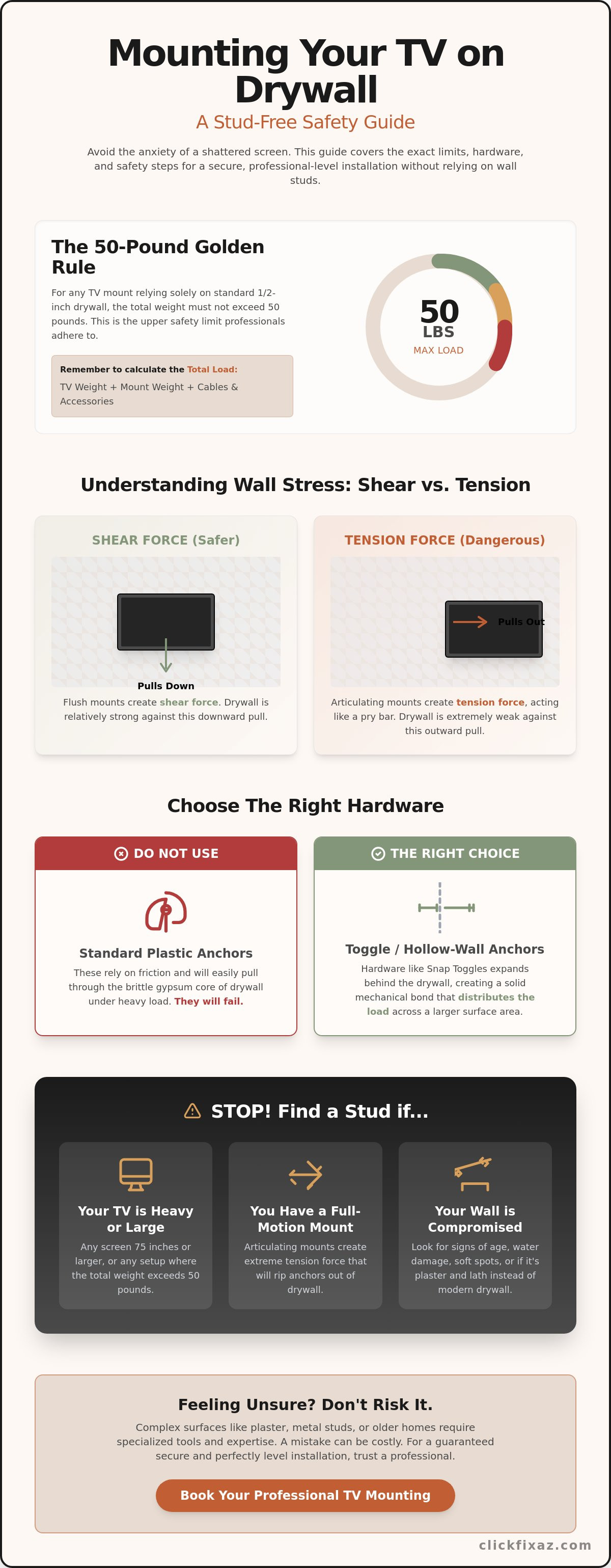
Adhere to the 50-pound rule. Most residential drywall is only 1/2-inch thick. It is designed to be a finish, not a load-bearing structure. For any installation relying solely on the wall board, 50 pounds is the upper safety limit. If your TV and mount combined exceed this weight, you are gambling with your equipment. Professional installers rarely push this limit. They know that drywall cannot handle the stress of heavier units without internal framing support.
Understand the physics of the mount. Two forces are at play: shear and tension. Shear force pulls straight down toward the floor. Tension pulls outward away from the wall. Drywall is relatively strong against shear force. It is incredibly weak against tension. This is why standard plastic expansion anchors fail every time. They rely on friction and push against the brittle gypsum. Instead, look into different types of drywall anchors like toggle bolts. These hardware pieces expand behind the wall to create a solid mechanical bond. They distribute the load across a larger area of the paper backing.
The Anatomy of a Drywall Mount
Drywall is a sandwich of gypsum and heavy paper. The gypsum core provides the bulk. The paper provides the tensile strength. When you mount tv on drywall, the hardware must engage both layers. A high-quality mount plate spreads the weight across the surface. It prevents the load from concentrating on a single point. Three factors determine if the installation will hold. Total weight is the first. The depth of the mount is the second. The specific anchor type is the third. If any of these are mismatched, the wall will fail.
When to Search for a Stud Instead
Large screens require more than just drywall. If your TV is 75 inches or larger, find a stud. Even modern OLED and LED models carry significant weight. Articulating or full-motion mounts are also a deal-breaker for stud-less installs. These mounts act like a pry bar. When you pull the TV away from the wall, the tension increases exponentially. This force will rip even the best anchors through the wall. Finally, inspect the wall for age or water damage. Soft spots are a warning sign. If the drywall feels spongy or shows discoloration, it has lost its structural integrity. You must find a solid stud or perform a proper repair before proceeding.
Understanding Drywall Load Limits and Weight Ratings
Drywall thickness dictates your safety margin. Most residential homes use standard 1/2-inch panels. Some newer builds or fire-rated walls use 5/8-inch Type X drywall. The 5/8-inch board offers more "bite" for anchors, but it is still just compressed gypsum and paper. You must calculate the total load before you begin. The total load isn't just the TV's weight. It includes the mounting bracket, soundbars, and the heavy bundle of HDMI and power cables. These additions can add five to ten pounds to your project. Overlooking these small weights leads to unexpected wall failure.
Older homes in the Tucson area present unique challenges. Decades of extreme heat and seasonal humidity changes take a toll on building materials. Gypsum becomes brittle over time. It can lose its structural bond and crumble into dust during the drilling process. If your home was built before 1990, inspect the wall for signs of degradation. Brittle drywall won't hold the rated capacity of a modern anchor. If you aren't sure about your wall's integrity, it's best to consult a professional installation guide to verify your safety steps.
The leverage factor is often ignored by DIYers. A TV sitting flush against the wall applies shear force, which pulls straight down. A TV extended away from the wall applies tension, which pulls the anchors out. This distance acts like a pry bar on your wall board. For a safe install, keep the unit as close to the wall as possible. If you want to mount tv on drywall securely, every inch of distance from the surface increases the risk of the hardware pulling through the gypsum core.
1/2-Inch Drywall Specifications
Standard 1/2-inch drywall has a safe static load limit of approximately 10 pounds per square foot in ideal conditions. This rating assumes the board is dry and the fasteners are properly spaced. The most common failure points occur near electrical boxes or previous repairs. These areas have already been cut, leaving the surrounding gypsum weak. Don't drill within four inches of an outlet or switch if you are relying on the drywall alone. A clean, solid section of board is required for any heavy hardware to seat correctly.
The Risk of Articulating Mounts
Articulating mounts are the primary cause of drywall-only failures. Pulling a screen 20 inches away from the wall can triple the stress on your top anchors. The mechanical advantage of the arm works against the brittle wall board. We recommend using only fixed or tilting mounts for drywall-only installations. These designs keep the center of gravity close to the wall. Watch for "puckering" or small cracks around the mounting plate. If you see the drywall bulging or dimpling under the weight, the tension is too high. Remove the TV immediately to prevent a total structural collapse.
The Best Anchors for Mounting Without Studs
Anchor selection determines if your TV stays on the wall or hits the floor. You cannot use the cheap plastic plugs included in the box. Those are designed for masonry or light pictures. To mount tv on drywall safely, you need hardware that creates a mechanical bond behind the wall board. The goal is to distribute weight across the largest possible surface area. This prevents the brittle gypsum core from crumbling under pressure. High-quality hardware is the only way to avoid a catastrophic failure.
Snap Toggles are the industry standard for hollow-wall installations. They consist of a solid metal channel that flips horizontal once inside the wall. This channel acts as a heavy-duty brace against the back of the drywall. Molly bolts are another reliable option. They use a permanent metal sleeve that expands like an umbrella when tightened. Both options far outperform threaded drywall anchors. Threaded anchors are convenient but limited. Only use them for small monitors or TVs weighing under 20 pounds. For anything larger, the risk is too high.
Safety is the primary objective of any installation. Unsecured furniture and electronics cause thousands of injuries every year. We support the CPSC's Anchor It! campaign, which highlights the importance of proper hardware in preventing tip-over accidents. Using the right anchor isn't just about protecting your TV. It is about keeping your home safe for everyone. Never settle for "good enough" when choosing your fasteners.
Snap Toggles vs. Standard Bolts
Snap Toggles use a unique metal bar mechanism. You drill a hole, slide the metal channel through, and pull the straps tight. The bar locks flat against the interior side of the drywall. This creates a massive increase in load-bearing capacity. Unlike standard toggle bolts, Snap Toggles allow you to remove the mounting bracket without losing the anchor inside the wall. Most residential installations require a 1/2-inch drill bit for the channel to pass through. Always check the manufacturer's specs for the exact bit size. Precision drilling ensures the anchor seats correctly.
The Plywood Reinforcement Method
Heavy units or articulating mounts require a structural bridge. This is the professional "cleat" method. You secure a 3/4-inch plywood plate across two wall studs using lag bolts. Then, you mount the TV bracket directly to the plywood. This method bypasses the drywall's weight limits entirely. It is mandatory for any TV over 65 inches that uses a full-motion arm. You can use our painting services to match the plywood to your Tucson interior wall colors. This creates a clean, intentional look. It provides maximum security without compromising your home's aesthetic.
Step-by-Step: How to Mount a TV on Drywall Safely
Gather your tools before you begin. You need a power drill, a high-quality level, painters tape, and a Shop-Vac. Keeping your workspace clean is part of a professional install. Precision is non-negotiable. If you want to mount tv on drywall, you must follow a strict sequence. Start by visualizing the final placement. Use painters tape to mark the outer corners of the TV on the wall. This helps you confirm the height and centered position before you make a single hole. It is much easier to move tape than it is to patch drywall.
Confirm your hardware is rated for the total load. This includes the TV, the bracket, and any soundbars. Most modern screens weigh between 30 and 80 pounds. Check the manufacturer's weight rating on your anchor box. If the numbers don't add up, stop. You need hardware that can handle at least four times the weight of the equipment. This safety margin accounts for the tension of cables and the occasional bump or adjustment. Never skip this calculation.
Preparation and Utility Checks
Safety begins behind the wall surface. Use a high-quality sensor to scan for studs, pipes, and wires. Verify these findings with a non-contact voltage tester. This tool detects live AC lines that a standard stud finder might miss. Avoid mounting directly above Tucson fireplaces without a thermal shield. The rising heat can degrade internal electronics and weaken the gypsum over time. Once you confirm the area is clear, mark your bracket's VESA pattern onto the painters tape. This ensures your holes are exactly where the bracket requires them to be.
Installing the Toggle Anchors
Drill your pilot holes with care. Use a sharp bit to avoid tearing the drywall paper or cracking the brittle gypsum core. If you are using heavy-duty toggles, the hole will be large, often 1/2-inch. Insert the metal channel through the hole. Pull the plastic straps until the channel sits flat against the back of the wall. Zip the collar tight to the surface. Snap off the excess straps. This creates a solid mounting point that won't shift. Ensure the bracket sits perfectly flush against the wall surface. Any gap will cause the mount to wiggle and eventually fail.
Level the bracket twice. Tighten the bolts halfway first. Check the level again. Wall surfaces are rarely perfectly flat; micro-adjustments are common during this stage. Tighten the bolts fully once the bubble is centered. Before you lift the screen, perform a stress test. Apply firm manual pressure to the bracket. It should feel like a part of the wall. If there is any movement or "give," stop immediately. You may need to relocate the mount or reinforce the wall. If you prefer a guaranteed result, you can book our TV mounting service to handle the heavy lifting and technical alignment.
Professional TV Mounting in Tucson: When to Skip DIY
DIY projects provide a sense of accomplishment. They also carry significant risk. A 75-inch screen hitting the floor is a loud, expensive mistake. You must weigh the cost of professional installation against the cost of a total failure. If a mount pulls out, you are looking at more than just a broken TV. You will need drywall repair and potentially a new painting job to fix the structural damage. Hiring an expert ensures the job is done once. It ensures the job is done right.
Tucson homes feature diverse construction styles. You will find standard 1/2-inch drywall in new Casas Adobes builds. You will encounter metal studs in Marana and Oro Valley condos. Some older homes in the Catalina Foothills use plaster over lath. This material is brittle and unpredictable. It requires specialized diamond-tipped bits and unique anchoring strategies. If you want to mount tv on drywall in a home with metal studs or aging plaster, the standard DIY hardware won't suffice. Standard advice to mount tv on drywall does not apply to these complex surfaces. If you feel resistance that doesn't feel like wood or hollow space, stop. You may be hitting a structural quirk that requires a professional eye.
Clean aesthetics are the goal of any modern media setup. Dangling wires ruin the look of a high-end screen. Professional installers use in-wall power kits to hide cables safely. This maintains a clean, wireless look while staying compliant with building codes. We provide commercial-grade security for home theaters. Your equipment stays level. Your walls stay intact. Your home looks better than you imagined.
ClickFix Professional Standards
Our technicians do not guess. We verify wall integrity before we ever pull out a drill. We use industrial-grade sensors to map every hidden utility. Our "No-Mess" guarantee applies to every project. Whether we are working on standard drywall or custom shiplap, we leave your home spotless. We use high-velocity vacuums to catch dust at the source. Our service area is broad. We serve clients from Red Rock to the heart of Tucson. We bring the same level of discipline to every zip code.
Integrated Home Services
Your media center is often the focal point of the room. We offer more than just a bracket on a wall. We can pair your TV mounting with a new light fixture installation to reduce screen glare. If you want a truly built-in look, ask about our custom carpentry options. We can design media centers that fit your space perfectly. We handle the technical details so you can enjoy the results. Schedule your professional TV mounting with ClickFix today.
Secure Your Home Entertainment Setup
Success depends on selecting the right hardware and respecting wall limits. You can safely mount tv on drywall if you follow the physics of the load. Use high-capacity toggle bolts for hollow walls. Keep the total weight under 50 pounds for standard board. Avoid articulating arms on thin gypsum unless you bridge the studs with a plywood cleat. Precision matters more than speed. A secure installation protects your equipment and your family.
If the technical details or specific wall types feel overwhelming, professional help is a logical choice. We have been locally owned and operated in Southern Arizona since 2018. Our technicians bring specialized expertise in both TV mounting and professional drywall repair. We are proud of our 5-star rated service in Marana, Oro Valley, and the Foothills. We eliminate the guesswork. We prevent the structural failures that DIY attempts often face. We focus on results that stay on the wall.
Don't risk a fallen screen or a damaged wall. Get a Professional TV Mounting Quote in Tucson to ensure a secure, level, and clean installation. Your home deserves a professional finish that lasts.
Frequently Asked Questions
Can I mount a 65-inch TV on drywall without a stud?
Yes, you can mount a 65-inch TV provided the combined weight of the screen and bracket stays under 50 pounds. Most modern LED and OLED screens are light enough for this method when using high-capacity toggle bolts. You must verify the exact weight on the manufacturer's spec sheet before drilling. If the unit exceeds 50 pounds, you must locate a stud or use a reinforcement plate to ensure safety.
What is the best drywall anchor for a TV mount?
Snap Toggles are the superior choice for any heavy-duty wall installation. These anchors use a solid metal channel that flips horizontal behind the wall to distribute weight across a wide surface area. They are much stronger than plastic expansion plugs or threaded anchors. This hardware allows you to remove the bracket for maintenance without losing the anchor inside the wall cavity. It is the professional standard for hollow-wall mounting.
Will mounting a TV on drywall damage my wall?
Proper installation with the correct hardware causes minimal damage limited to the necessary drill holes. Using incorrect anchors or exceeding the weight capacity can lead to puckering, cracking, or total structural failure of the gypsum core. If you decide to relocate your screen later, our team provides professional drywall repair to return the surface to its original state. Clean holes are easy to patch; structural collapses are not.
How much weight can 1/2-inch drywall hold for a TV?
Standard 1/2-inch drywall can support a static load of up to 50 pounds when you use professional-grade toggle anchors. This rating assumes the wall board is dry and structurally sound. To mount tv on drywall safely, you must account for the "leverage factor" of the bracket. Fixed mounts are safest for this weight limit. Articulating arms should never be used on drywall alone because they multiply the tension on the anchors.
Do I need a special drill bit for toggle bolts?
Yes, you typically need a 1/2-inch or 5/8-inch drill bit to allow the metal toggle channel to pass through the wall. Check the specific hardware instructions for the required diameter before you begin. Use a sharp bit to prevent the drywall paper from tearing. A clean hole ensures the anchor collar sits flush against the surface. This creates the tightest possible fit for the mounting bracket.
What happens if I hit a metal stud instead of wood?
You must switch to specialized hardware if you encounter metal studs. Standard lag bolts intended for wood will not secure the mount and can strip the thin metal. Use self-tapping metal screws or toggle bolts designed for steel framing. Metal studs are common in newer Tucson condos and commercial spaces. They require a different approach to ensure the mount remains stable over time and does not vibrate loose.
Can I mount a TV on a shiplap wall without studs?
No, you should always secure the mount to the underlying studs when working with shiplap. Shiplap is a decorative finish held by small finish nails. It is not designed to carry the weight of a television. To mount tv on drywall that has been covered with shiplap, your fasteners must pass through the wood and the gypsum to reach the structural framing. This is the only way to prevent the boards from pulling away.
How do I hide the wires if I mount on drywall?
Use an in-wall power kit to route cables safely through the wall cavity. These kits include recessed outlets and brush plates to create a clean, wireless look. Do not run a standard TV power cord directly through the wall. This is a fire hazard and a code violation. Professional kits are designed to handle the heat and meet residential safety standards. It is the best way to achieve a professional aesthetic without compromising safety.